The OWASP Top 10 for LLM Applications (2025) in plain language
Ten ways an AI feature can go wrong, according to OWASP, Summarized.
If your product interacts with a large language model (LLM) then you need to go through the OWASP Top 10 for LLM applications. This article walks through the 2025 edition summarized.
For each risk you get three things: what it means, one example taken from OWASP's own scenarios, and the first steps OWASP recommends. Each section links to the official entry, which has the full list of examples, mitigations and references.
The ten at a glance
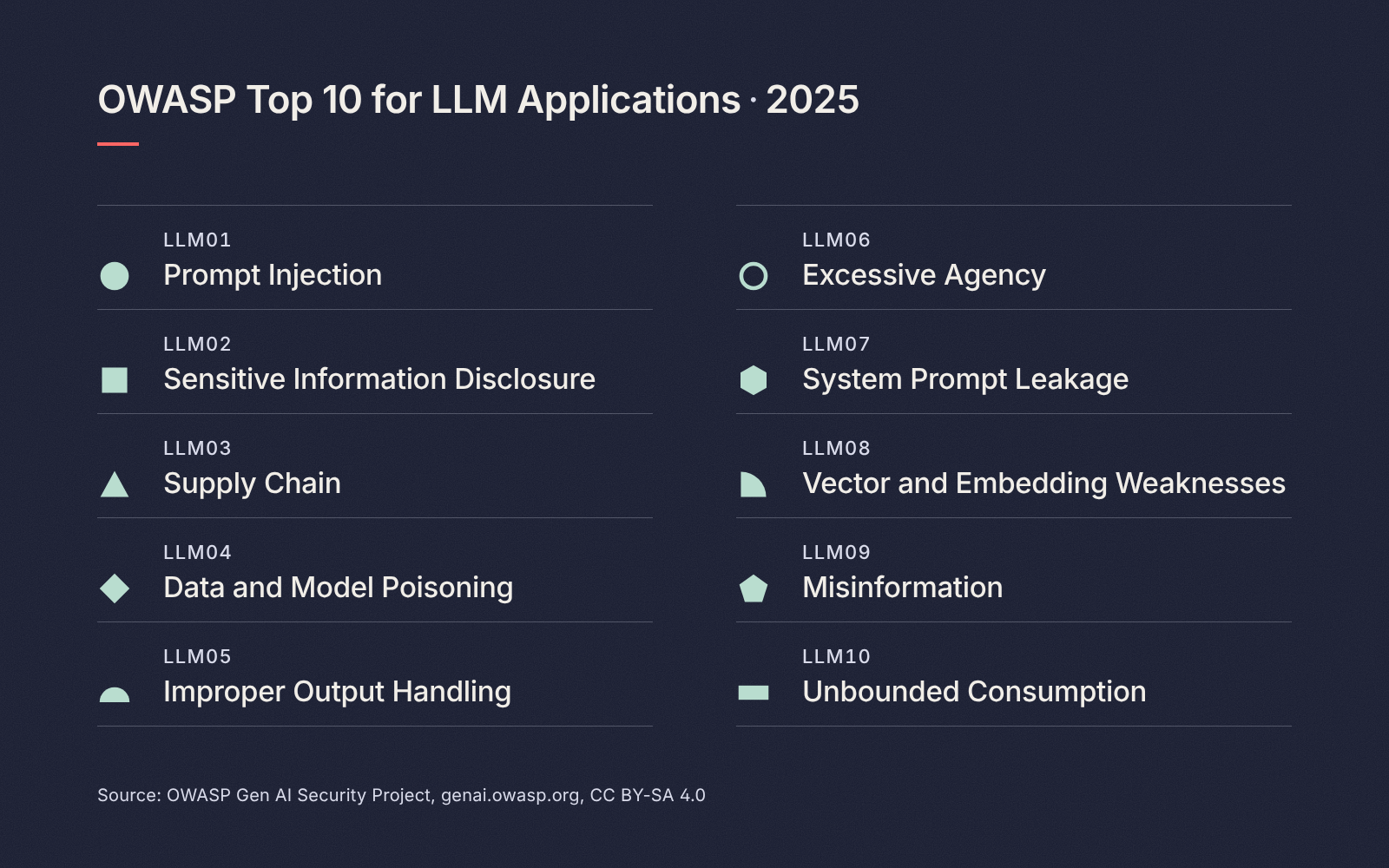
LLM01: Prompt Injection
What it means. Input changes the model's behaviour or output in ways you did not intend. It can be direct, typed by the person using the feature, or indirect, hidden in something the model reads, such as a web page or a file. The text does not have to be visible to a person; it only has to be read by the model.
An example from OWASP. Someone asks an assistant to summarise a web page. The page contains hidden instructions that make the model insert an image linking to a URL, which leaks the private conversation.
What OWASP recommends first.
- Give the model a clear role and limits in the system prompt, and tell it to ignore attempts to change them.
- Define the output format you expect and check it with ordinary code.
- Filter input and output.
- Give the model the least access it needs, and keep the application's own API tokens and functions in code, not in the model's hands.
- Require a person's approval for high-risk actions.
- Keep external content separate and clearly marked as untrusted.
- Test it like an attacker would, treating the model as an untrusted user.
OWASP is direct about the limits: because of how these models work, it is unclear whether any fool-proof way to prevent prompt injection exists. The steps reduce the impact. It also notes that retrieval (RAG) and fine-tuning do not fully remove the problem.
LLM02: Sensitive Information Disclosure
What it means. The model's output exposes something it should not: personal data, financial or health details, confidential business data, credentials or legal documents. For model owners it can also mean proprietary training methods or source code.
An example from OWASP. A user receives a response that contains another user's personal data, because data was not properly sanitised.
What OWASP recommends first.
- Scrub or mask sensitive content before it is used for training, so user data does not end up in the model.
- Limit access to sensitive data on the principle of least privilege, and restrict which data sources the model can reach.
- Keep clear policies on data retention, use and deletion, and let people opt out of having their data used for training.
- Detect and redact confidential content before it is processed.
OWASP adds a caution: telling the model in the system prompt what it must not return can help, but such restrictions may not always be honoured and can be bypassed, for example by prompt injection.
LLM03: Supply Chain
What it means. Your AI feature depends on things other people made: models, training data, adapters, libraries and hosting platforms. Any of them can be outdated, tampered with or poisoned. OWASP also lists licensing risk, and unclear terms and privacy policies that lead to your application's sensitive data being used to train a model.
An example from OWASP. After a popular model is removed, an attacker exploits the interest in it and publishes a fake version under the same name, containing malware and backdoors.
What OWASP recommends first.
- Vet data sources and suppliers, including their terms and privacy policies, and review them regularly.
- Scan for, manage and patch vulnerable or outdated components.
- Evaluate and red-team a third-party model for your own use case before choosing it.
- Keep an up-to-date inventory of components with a software bill of materials (SBOM), including licences.
- Use models only from verifiable sources, and check their integrity with signing and file hashes.
LLM04: Data and Model Poisoning
What it means. Data used for pre-training, fine-tuning or embeddings is manipulated to introduce vulnerabilities, backdoors or biases. OWASP calls this an integrity attack. A backdoor can leave the model behaving normally until a trigger changes its behaviour, which makes it hard to test for.
An example from OWASP. A malicious actor or competitor creates falsified documents for training, and the model's output then reflects those inaccuracies.
What OWASP recommends first.
- Track where data comes from and how it is transformed.
- Vet data vendors rigorously, and compare model output against trusted sources to spot signs of poisoning.
- Limit the model's exposure to unverified data sources.
- Version your datasets so changes and manipulation can be detected.
- Test robustness with red team exercises.
LLM05: Improper Output Handling
What it means. The application passes the model's output on to other components without validating, sanitising or handling it properly. Because input can steer what the model writes, this is like giving users indirect access to whatever the output reaches. OWASP lists cross-site scripting, cross-site request forgery, server-side request forgery, privilege escalation and remote code execution among the possible results.
An example from OWASP. Model output is passed straight to a system shell or a function such as exec or eval, which results in remote code execution. Another: SQL written by the model is run without parameterisation, which leads to SQL injection.
What OWASP recommends first.
- Treat the model as any other user. Validate its responses before they reach backend functions.
- Encode output for the place it is used, such as HTML encoding for web content.
- Use parameterised queries or prepared statements for every database operation that involves model output.
- Use a strict Content Security Policy.
- Log and monitor model output to detect unusual patterns.
LLM06: Excessive Agency
What it means. The system can take damaging actions in response to unexpected, ambiguous or manipulated model output. OWASP names three root causes: too much functionality, too many permissions and too much autonomy.
An example from OWASP. An assistant summarises incoming email. It only needs to read messages, but the plugin it uses can also send them. A crafted incoming email tricks the model into searching the inbox for sensitive information and forwarding it to the attacker.
What OWASP recommends first.
- Offer the model only the extensions it needs, and keep each extension to the functions it needs.
- Avoid open-ended extensions such as "run a shell command" or "fetch a URL" where a narrower one will do.
- Give each extension the minimum permissions on the systems it touches.
- Act in the context of the specific user, with that user's authorisation.
- Require a person to approve high-impact actions.
- Enforce authorisation in the downstream systems, not in the model.
OWASP notes that logging, monitoring and rate limiting do not prevent this risk, but they limit the damage.
LLM07: System Prompt Leakage
What it means. The instructions you give the model may hold information you did not intend anyone to discover. OWASP's main point is easy to miss:
The system prompt should not be treated as a secret, and it should not be used as a security control.
The real risk is what sits behind it: secrets stored in the wrong place, or checks left to the model that should be enforced elsewhere.
An example from OWASP. A system prompt contains credentials for a tool the model can use. The prompt leaks, and the attacker uses the credentials for other purposes.
What OWASP recommends first.
- Keep sensitive data such as API keys, database names, user roles and permission structures out of system prompts.
- Do not rely on the system prompt for strict behaviour control. Enforce it in systems outside the model.
- Put guardrails outside the model that inspect its output.
- Enforce security controls such as privilege separation and authorisation checks independently of the model, in a deterministic and auditable way.
LLM08: Vector and Embedding Weaknesses
What it means. This one applies to systems that use retrieval augmented generation (RAG), where the model answers with the help of external knowledge sources such as your own documents. Weaknesses in how vectors and embeddings are generated, stored or retrieved can be used to inject harmful content, manipulate output or reach sensitive information. OWASP's examples include information leaking between users of a shared vector database, and attackers inverting embeddings to recover source information.
An example from OWASP. A job applicant submits a résumé with hidden text, white on a white background, telling the system to recommend the candidate. A screening system that uses RAG reads the hidden text and later follows it.
What OWASP recommends first.
- Use fine-grained, permission-aware vector and embedding stores, with strict partitioning between groups of users.
- Validate knowledge sources, accept data only from trusted and verified sources, and audit the knowledge base regularly.
- Review and classify data when you combine sources.
- Keep detailed, immutable logs of retrieval activity.
LLM09: Misinformation
What it means. The model produces false or misleading information that looks credible. OWASP names hallucination as a major cause, and overreliance, where people trust the output without checking it, as what makes the impact worse. As one of OWASP's scenarios points out, no attacker is needed for this to cause harm.
An example from OWASP. Attackers look for package names that coding assistants commonly invent, then publish malicious packages under those names. Developers who trust the suggestion install them.
What OWASP recommends first.
- Ground answers in verified information from trusted sources, using retrieval augmented generation.
- Have people cross-check output and review it, especially for critical or sensitive information.
- Validate key outputs automatically.
- Tell users plainly about the risks and limits, and label AI-generated content in the interface.
- Establish secure coding practices so that incorrect code suggestions do not introduce vulnerabilities.
LLM10: Unbounded Consumption
What it means. The application lets users run excessive, uncontrolled requests against the model. OWASP lists the results: denial of service, economic losses, model theft and degraded service. It points to the high computational demands of LLMs, especially in cloud environments, as what makes them vulnerable.
An example from OWASP. In a "denial of wallet" attack, someone generates excessive operations to exploit a pay-per-use AI service, causing costs the provider cannot sustain.
What OWASP recommends first.
- Validate input and enforce reasonable size limits.
- Apply rate limits and per-user quotas.
- Set timeouts and throttle resource-intensive operations.
- Monitor resource use and detect unusual patterns.
- Design the system to degrade gracefully under heavy load.
A sensible first pass
For a quick Audit the following four questions cover a lot of ground:
- What can the model read? List every source that feeds a prompt, and remove what it does not need (LLM01, LLM02, LLM08).
- What can it do? List its tools and permissions, cut them to the minimum, and put a person in front of high-impact actions (LLM06).
- Where does its output go? Treat it as untrusted wherever it lands: a page, a query, a shell, another system (LLM05).
- What stops it running away? Size limits, rate limits, timeouts and monitoring of resource use (LLM10).
It is important for all of the Top 10 to be Documented and Enforcing the Policies.
Source and licence
This article is adapted from the OWASP Top 10 for LLM Applications 2025, copyright OWASP Foundation, Inc., as retrieved on 17 November 2026. The original is licensed under Creative Commons Attribution-ShareAlike 4.0.
Changes from the original: the ten entries are summarised and reworded, one or two examples are chosen from each entry, the lists of mitigations are shortened, and the grouping and the "sensible first pass" are added by grcHero. This adaptation is shared under the same licence, CC BY-SA 4.0. OWASP does not endorse grcHero or this article. OWASP is a trademark of the OWASP Foundation, Inc.
Practical security and governance guidance for teams building software.